A visual editor for sites built in code, on macOSv1.0.0 is out
The mid between
code and no-code.
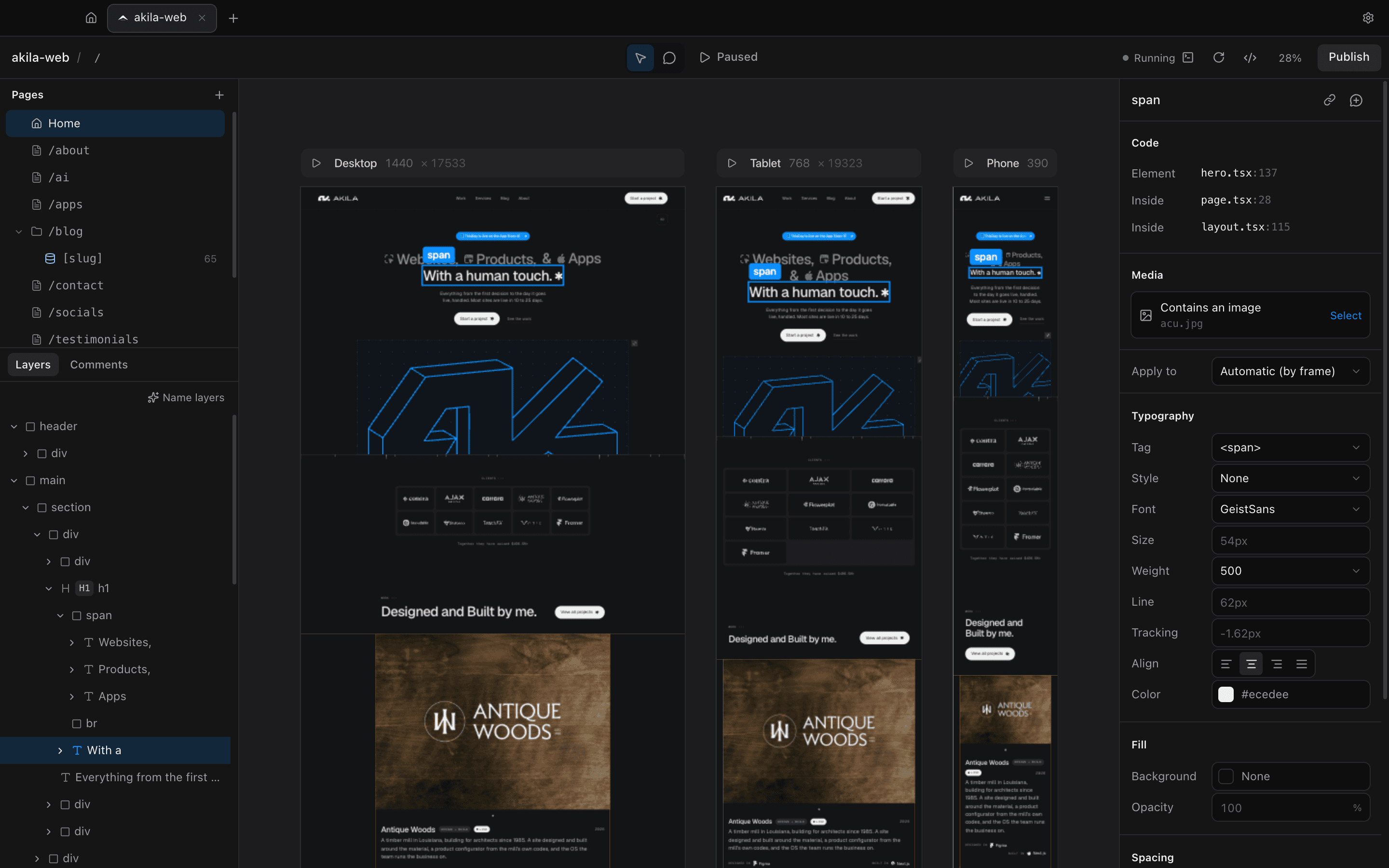
midcode opens your project on a live canvas. Click anything to see where it lives in the code, change it by hand, and the edit lands in your source files as a clean diff.
- Works with
- Next.js, Vite, SvelteKit, Astro…
- Writes to
- Your source files
- Account
- None needed
- Runs
- Locally, on your Mac
Why midcode
Your agent builds the site. You finish it by eye. Click an element and midcode points to hero.tsx:137. Change the type, swap an image, fix a line of copy, and it lands in your file as a +1 −1 diff. No tokens spent on a nudge.
01/Features
Design on the real thing. No mockups, no export step.
midcode edits the site you already have, in the same files your agent works in. What you click is what ships.
Click to code.
Select any element and see exactly where it’s written: the file, the line, and every component it sits inside. Copy the reference straight into your agent.
Every breakpoint, live.
Your real site runs on an infinite canvas at Desktop 1440, Tablet 768 and Phone 390, full page height, side by side. Select once, see it in all three.
Styles from your tokens.
Type, color, spacing and radius come from your Tailwind @theme. midcode swaps classes in place, so the diff is the edit and nothing else.
Comments for your agent.
Pin a note to any element, attach files, then copy a brief with the file and line that Claude Code or Cursor can act on. Saved in your project’s .midcode folder.
Branches and publish.
Switch or create branches, review every change, then commit and push in one step. On a repo connected to Vercel, that’s a deploy.
Layers that name themselves.
Apple Intelligence turns a wall of divs into Hero, Client logos and Footer. It runs on your Mac: offline, free, no tokens spent.
And the details
- Double-click any text to edit it
- Replace images, videos and backgrounds
- Edit alt text where the image lives
- Play runs the site, Pause inspects it
- Full-size preview with Hide UI
- Undo for every single edit
- Pages tree with dynamic routes
- Edit your design tokens in the app
- English and Spanish interface
02/How it works
Three steps. No new workflow.
- ~/sites/studio-web
Step 1: Open a project folder
Point midcode at your project folder. It starts the dev server and lays out every breakpoint. Nothing to configure, nothing uploaded.
- hero.tsx +1 −1
Step 2: Edit on the canvas
Click, double-click, adjust. Each change is written into your source files as you make it, and every edit can be undone.
- git push → vercel
Step 3: Publish
Review what changed, then commit and push in one click. Your repo stays the single source of truth.
03/Install
Get midcode.
Download the .dmg and drag midcode to Applications, or install it with Homebrew. Free for 3 days, then one payment.
License
$119$199One payment, yours for life. Every update included, on up to 3 Macs. Try it free for 3 days first.
Homebrew
Rather use the terminal? One command installs it; it updates itself from then on.
brew install --cask agusdellaquila/midcode/midcode04/FAQ
Questions. Short answers.
Only the lines you edit. Each change is written in place as a minimal diff: midcode never reformats or reprints your files, and every edit can be undone with ⌘Z.
Projects styled with Tailwind CSS on Next.js, Vite (React, Preact, Solid), React Router, Remix, Astro and SvelteKit are editable on the canvas. Nuxt, plain HTML and anything with a dev script open too, to check every breakpoint and comment. midcode runs your project’s own dev server, so what you see is your real site.
No. There’s nothing to install or configure, and midcode doesn’t touch your project’s config. Comments and layer names live in a .midcode folder you can commit or ignore.
No. midcode runs locally on your Mac, and Publish uses the git credentials your Mac already has. Connecting GitHub or Vercel is optional: it lets you follow the deploy right after you publish.
Your agent and midcode edit the same files. Changes your agent makes show up on the canvas as they land, and comments copy out as briefs with the exact file and line.
It’s free to try for 3 days. Then it’s one payment of $199, yours for life with every update, on up to 3 Macs. The first 50 get it for $119.
Design in the code you already have.
Open a project, click anything, ship the change. Your agent handles the big moves. You handle the details.